In short. Search across a company's whole knowledge base can be built in-house from open-source components. At FlyOptima it took one engineer a month on our own hardware. The system searches about 790 thousand text fragments in half a second, and a local model gives an answer with links to the documents in 40 seconds to a few minutes. The documents are processed on our own hardware.
Over a few years of work, any company accumulates a huge mass of mixed data: correspondence, contracts, diagrams, technical documents, meeting minutes, tasks, spreadsheets, presentations. Then a manager needs to find one long-settled decision in that mass.
For example, a project manager asks in the work chat which version of the diagram was agreed with the customer. Everyone remembers that the question was settled long ago and the decision was written down. Nobody remembers where.
One colleague suggests looking in the mail, another sends a presentation of the wrong version. The right record may sit in an email attachment, in meeting minutes, in a shared folder or in a comment on a task, and each of these places has its own search. They search until the end of the day and the next morning redraw the diagram from scratch, because that is faster than searching further.
The answer was written down long ago, but it cannot be found.
Data piles up and goes unused: there is no easy access to it. I founded FlyOptima in 2022; we build solutions for banks and fintech, and our product is FlyCoreBanking, a platform for cards and lending. The team is small, but in the documents, the wiki, the tracker tasks and the correspondence the count runs to hundreds of thousands of text fragments.
If nothing changes, decisions will keep being made a second time. A new employee will spend months asking about things that were described long ago, and when a person leaves, the company will lose what they remembered: the records will remain, but only they knew where in them the answer was.
Goal and result
There was one goal: to find an answer in the company archive in seconds, not in a day.
Today it works. We named the system FlyArchive; it is now at version 0.1. You ask it a question in your own words, and it searches by meaning and by exact word across about 790 thousand text fragments. The search takes half a second (median – 513 ms). The local model reads what was found and gives an answer with links to the documents: this takes from 40 seconds to a few minutes. When it first answered with links to our own documents, we were euphoric.
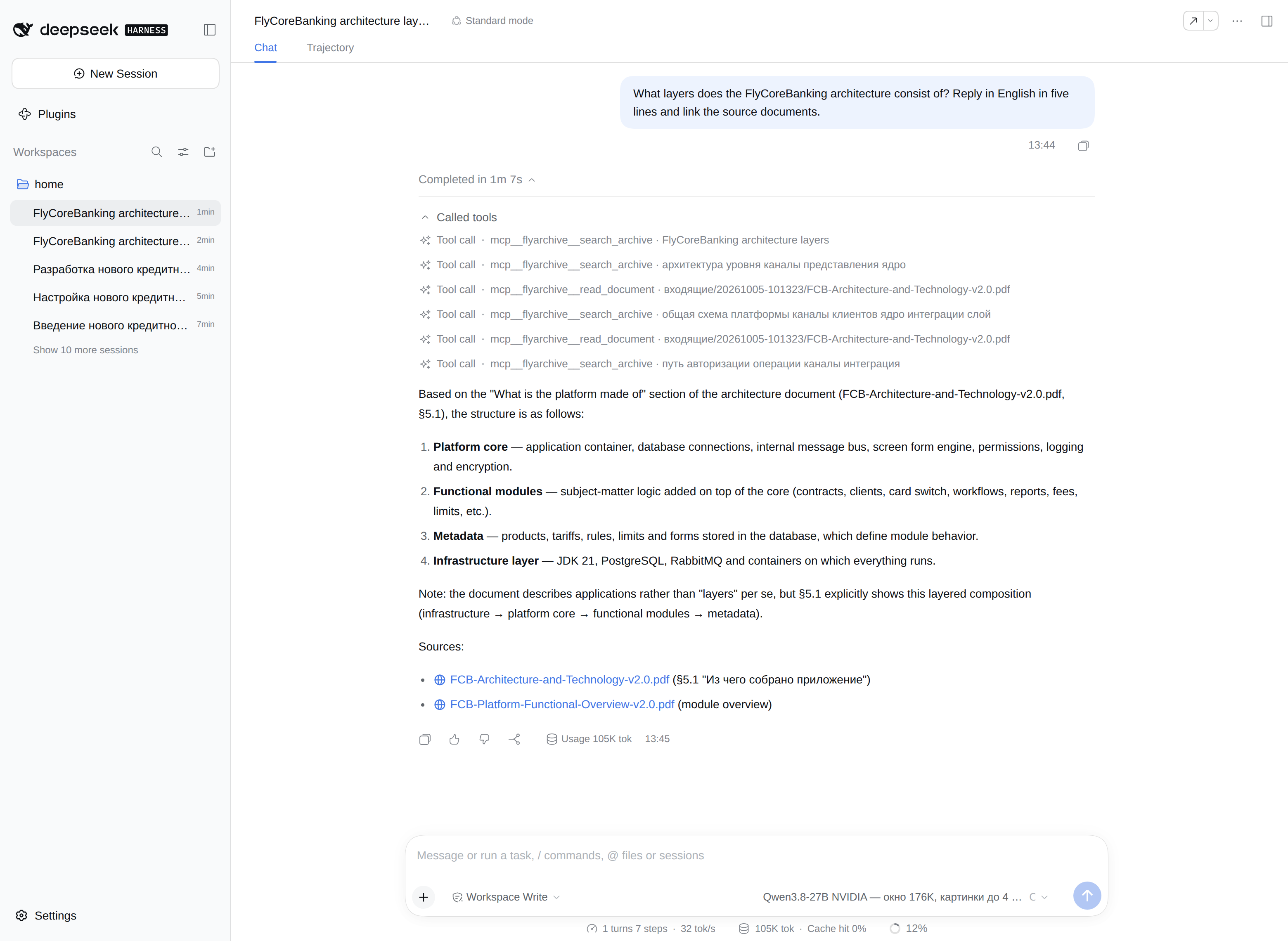
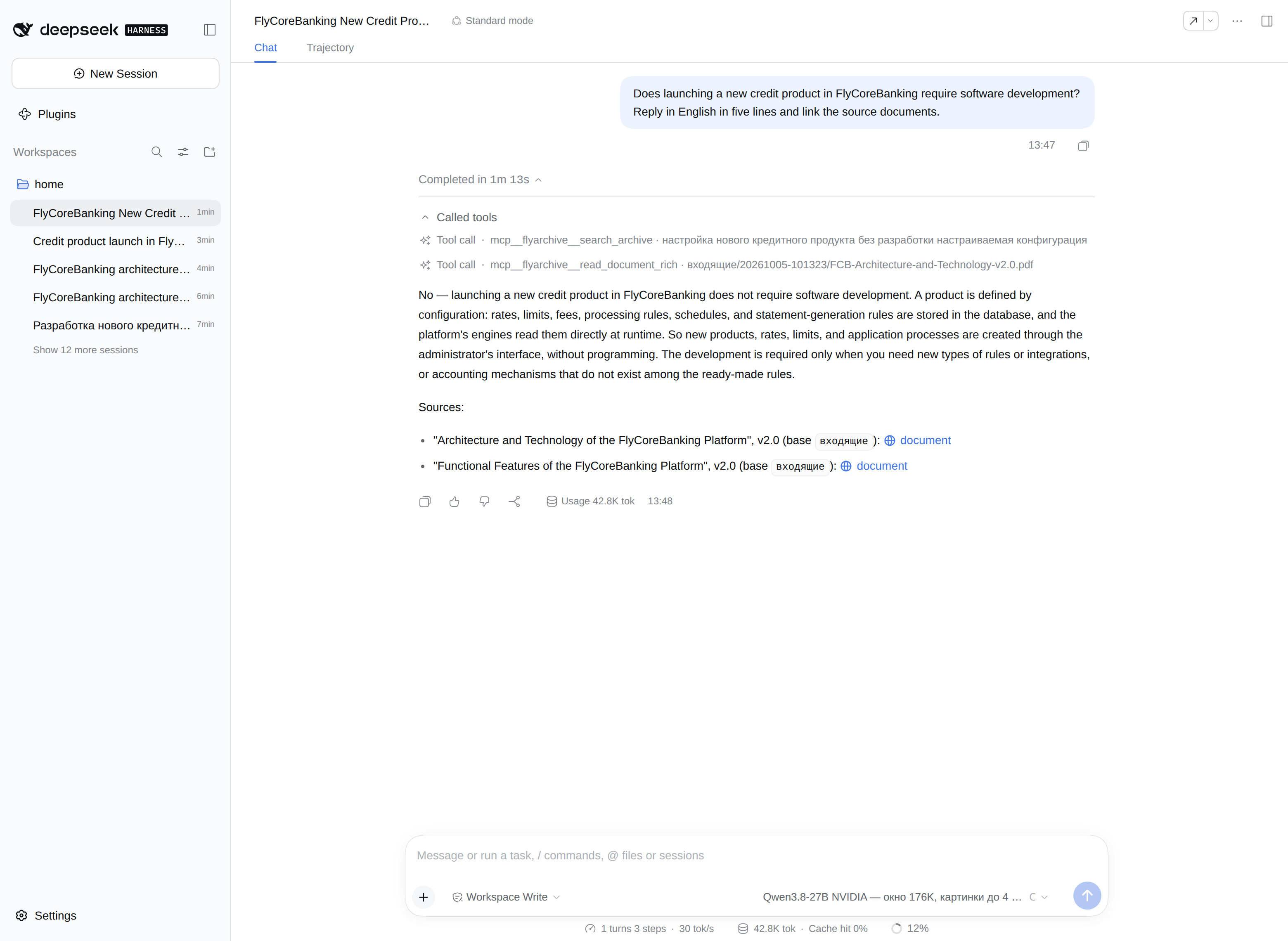
What it cost: the work of one engineer on our own hardware and a month from the idea to a working solution. The code is written by agent models under the engineer's supervision.
I will state the limits right away. There is one trust zone: whoever gets a token sees the whole archive. One model runs at a time. There is also one engineer. I use the system myself and issue tokens to part of the team. A company that has an engineer and its own hardware with a GPU can build one like it.
What it is built from
One engineer can manage this because almost everything has already been written by others. Our own code in the system comes to four parts: search, file intake, token-based access and the management plugin. The rest is ready-made components from the table, almost all of them open source.
| Component | Role | Licence |
|---|---|---|
| LanceDB | stores the search index, as files on disk | Apache-2.0 |
| BAAI/bge-m3 | the model that prepares text for search by meaning | MIT |
| Ollama | runs this model on the CPU | MIT |
| Qwen3.8-27B | the local language model, answers questions | Apache-2.0 |
| vLLM | runs the local model on the GPU | Apache-2.0 |
| llama-swap | an intermediary in front of the local model | MIT |
| PyMuPDF | reads PDF | AGPL-3.0 or commercial |
| python-docx, openpyxl, python-pptx | read Word, Excel and PowerPoint files | MIT |
| extract-msg | reads Outlook emails | GPL-3.0 |
| Docling | parses documents with tables | MIT |
| EasyOCR | recognises text in images | Apache-2.0 |
| SQLite | remembers which files are already in the archive | public domain |
| bubblewrap | sandbox for third-party programs and for file viewing | LGPL-2.0-or-later |
| systemd | starts the services and the scheduled processing | LGPL-2.1-or-later |
| 7-Zip | unpacks archives | LGPL-2.1+ |
| DeepSeek Harness (DSH) | the shell: chat with the model and plugins | MIT |
| MCP | the protocol through which the model reaches tools | Apache-2.0 |
| Tailscale | private network between devices | client – BSD-3-Clause, the service is closed source |
| Python, Node.js | languages of the server side and the plugin | PSF-2.0, MIT |
| Ubuntu in WSL2 | operating system | the packages have their own licences, the kernel – GPL-2.0 |
How it is structured
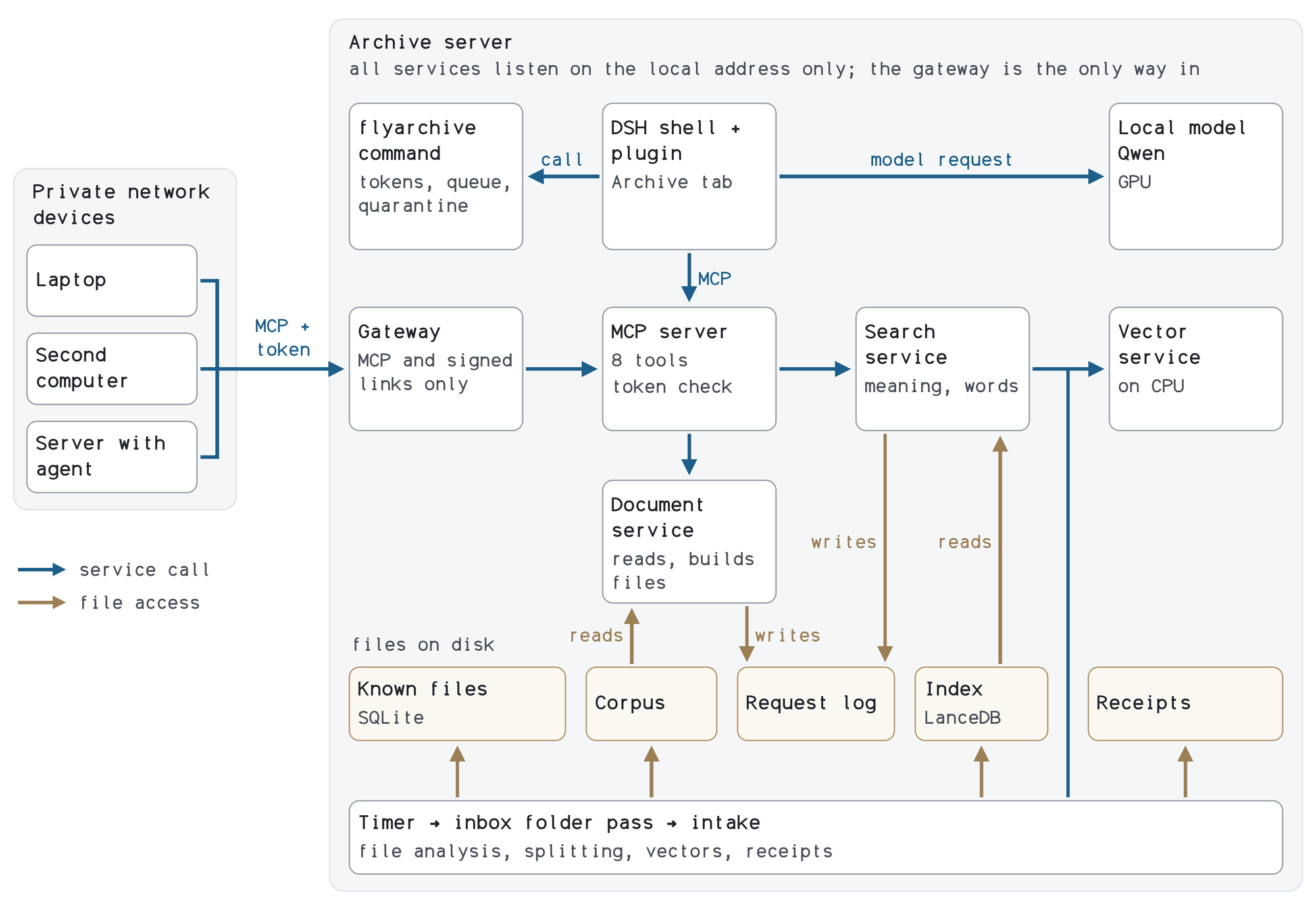
It is structured more simply than the table suggests. The archive server permanently runs the search service, the document service and the access service, through which models reach the archive. All of them are reachable only from inside the server itself; a single gateway is exposed to the company network.
Everything else starts on demand: the scheduled processing of the inbox folder, the management command flyarchive and the sandboxes for third-party programs. There are no separate database servers. The index, the list of already known files, the intake receipts and the request log sit as ordinary files on disk.
The DeepSeek Harness (DSH) shell serves as the chat. We rejected the first shell, Open WebUI: the model turned to the shell's built-in "knowledge" and got an empty answer. I believe DSH suited us because of its agent architecture with plugins: in it the model works as an agent, and for the model the archive is a set of tools. Our plugin adds a settings section and an Archive tab to the shell. It is connected with a single settings file, without modifying the shell itself.
Who reaches the archive and how
The archive is useful only when you can query it from any workplace. For us that is any device on the company's private network. The machines are joined into a Tailscale network, and the network itself provides the encryption. Outside this network the archive is unreachable: nothing is published to the internet. A laptop, a second computer or a server with an agent connects over MCP (Model Context Protocol) – the protocol through which models reach tools.
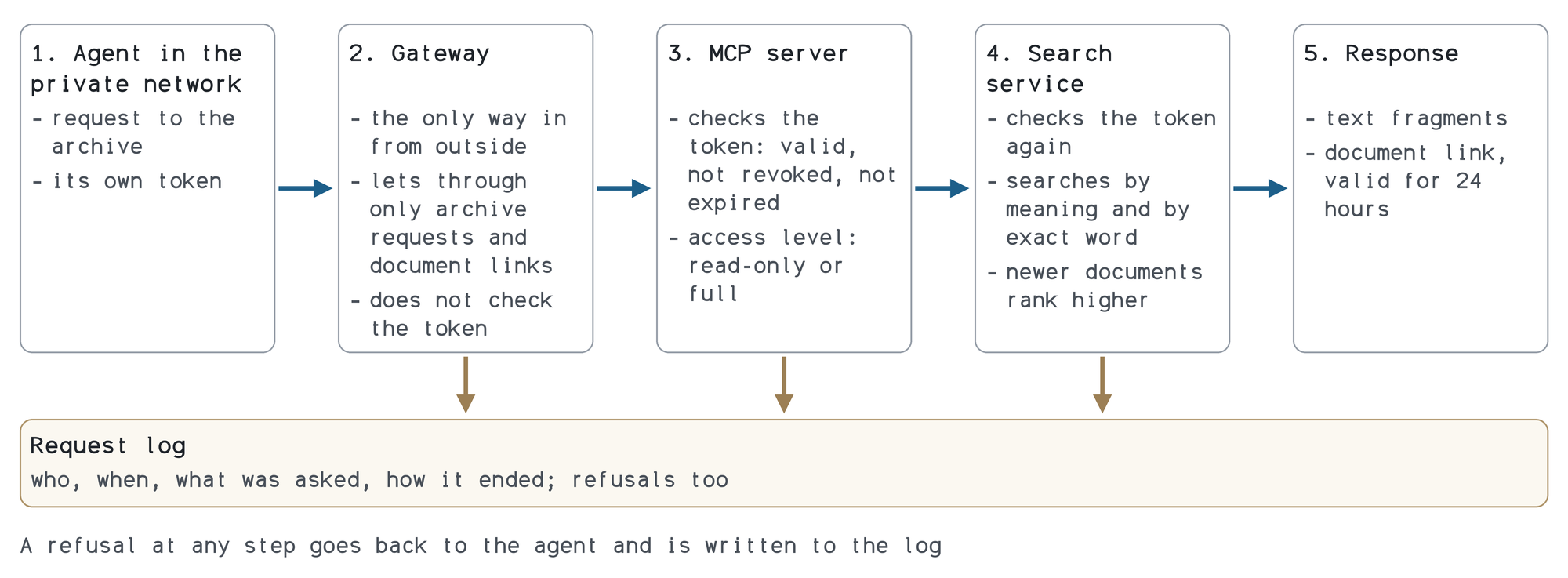
A request goes through five steps.
- The model or the shell on the employee's device sends the question and its token to the gateway.
- The gateway lets through only requests to the archive and links to documents. It does not check the token.
- The access service checks the token: whether the system knows it, whether it has been revoked and whether it has expired. The "read-only" level allows searching and reading documents; "full" – also creating files and submitting documents to the archive. Deleting a document or issuing a token through this entry point is not possible.
- The search runs in two ways at once, by meaning and by exact word, and ranks recent documents higher. The response carries the fragments found and a link to the document; the link is valid for 24 hours.
- The request is written to the log: which client asked, from which network node, what it searched for and how it ended. Refusals are logged too.
A token is issued per client and is revoked immediately: the next request with it will no longer pass.
The assistant in Telegram
My assistant "Yulia" on OpenClaw is connected to the archive in the same way, by token. She helps with my calendar and mail and takes a lot of routine off me. I gave her a read-only token and brought archive search into Telegram. Now, on the road or anywhere else, I ask the company knowledge base a question from my phone, and a model answers me. That is great: finding such an answer used to take a day.
This channel goes through the assistant's model and the messenger, so the token is read-only and is revoked in one action.
What is in the archive
You can search only what is gathered in one place, so everything the company has accumulated was put into the archive. The raw data is kept as files, in its original form: tracker tasks and wiki pages with attachments, work correspondence with attachments, working folders with documents. Together that is 148 GB. The archive directory is closed to other users.
For search, a document is cut into pieces of about 4000 characters; these are the fragments. The index holds about 790 thousand of them and takes up 5.5 GB. The index needs maintenance in one place: after a bulk load it has to be compacted, otherwise its size grows (ours grew from 7 to 35 GB).
The approval queue and the quarantine are kept separately from the archive and do not get into search.
Which documents the archive works with
The table shows which of the things put into the archive can be found by search and which open right in the interface.
| What | Gets into search | Opens in the interface |
|---|---|---|
| yes; scans without text – not yet, description by the model is in progress | page by page | |
| Word, Excel, PowerPoint (docx, xlsx, pptx) | yes | page by page |
| Old Office formats (doc, xls, ppt) | yes, after conversion | page by page |
| Emails (eml, msg) and a mail archive export (olm) | yes, together with attachments | header, text and attachments; an attachment opens the same way |
| Text and data (txt, md, csv, json, xml, sql, yaml, log) | yes | as text |
| HTML pages | yes | as a page, without scripts and external images |
| Diagrams (bpmn, drawio, svg) | the labels from the diagram | svg – yes; bpmn and drawio – not yet |
| Images (png, jpg, gif, tiff, bmp, webp) | recognised text; description by the model is in progress | yes |
| Archives (zip, 7z, tar) | the contents are checked and accepted one file at a time; rar – not yet | the contents list of the archive, without unpacking |
| Calendars (ics) | no | events |
| Programs and scripts | no: straight to quarantine | file details only |
| Video and audio | no | not yet |
How the archive is replenished
An archive assembled once starts going stale the next day. So it replenishes itself. A new document arrives in two ways: someone puts it in the inbox folder, or an agent with the full access level submits it. Every 30 minutes the system processes the incoming files: it checks them, puts the accepted ones in place and adds them to the index. A file that is already in the archive will not get into it a second time. For every batch a receipt remains: what arrived and what decision was made on each file.
Intake and quarantine
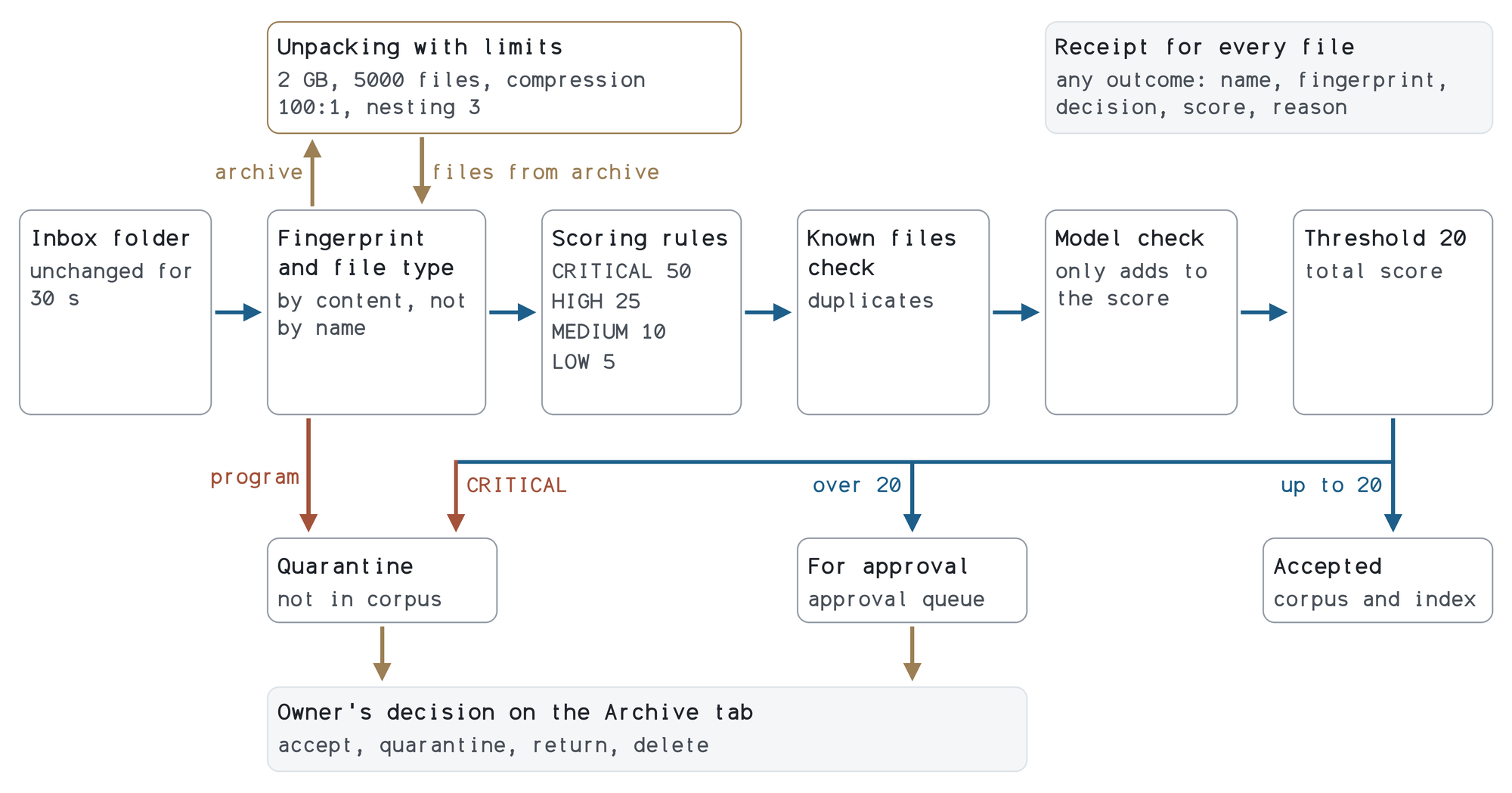
When the archive replenishes itself, anything at all can end up in search. That is why there is intake: it decides what gets into the archive. The logic is as follows.
- The file type is determined by content; the extension is not taken into account.
- A program goes straight to quarantine.
- An archive is unpacked with limits on size, number of files and nesting depth. An archive with a password or with suspicious paths inside goes to quarantine as a whole.
- Rules look for macros, hidden text, secrets and instructions addressed to the model. Each finding adds points.
- The sum of points is compared with a threshold of 20. Not above the threshold – the file is accepted; above it – the file waits in the queue until a person approves it. The most serious findings send the file to quarantine.
On top of the rules, a reviewer model reads the file, because the rules do not catch a politely written instruction for a model. It can only make the decision stricter.
The archive owner manages the queue and the quarantine in the shell's tab: accept, send to quarantine, return or erase.
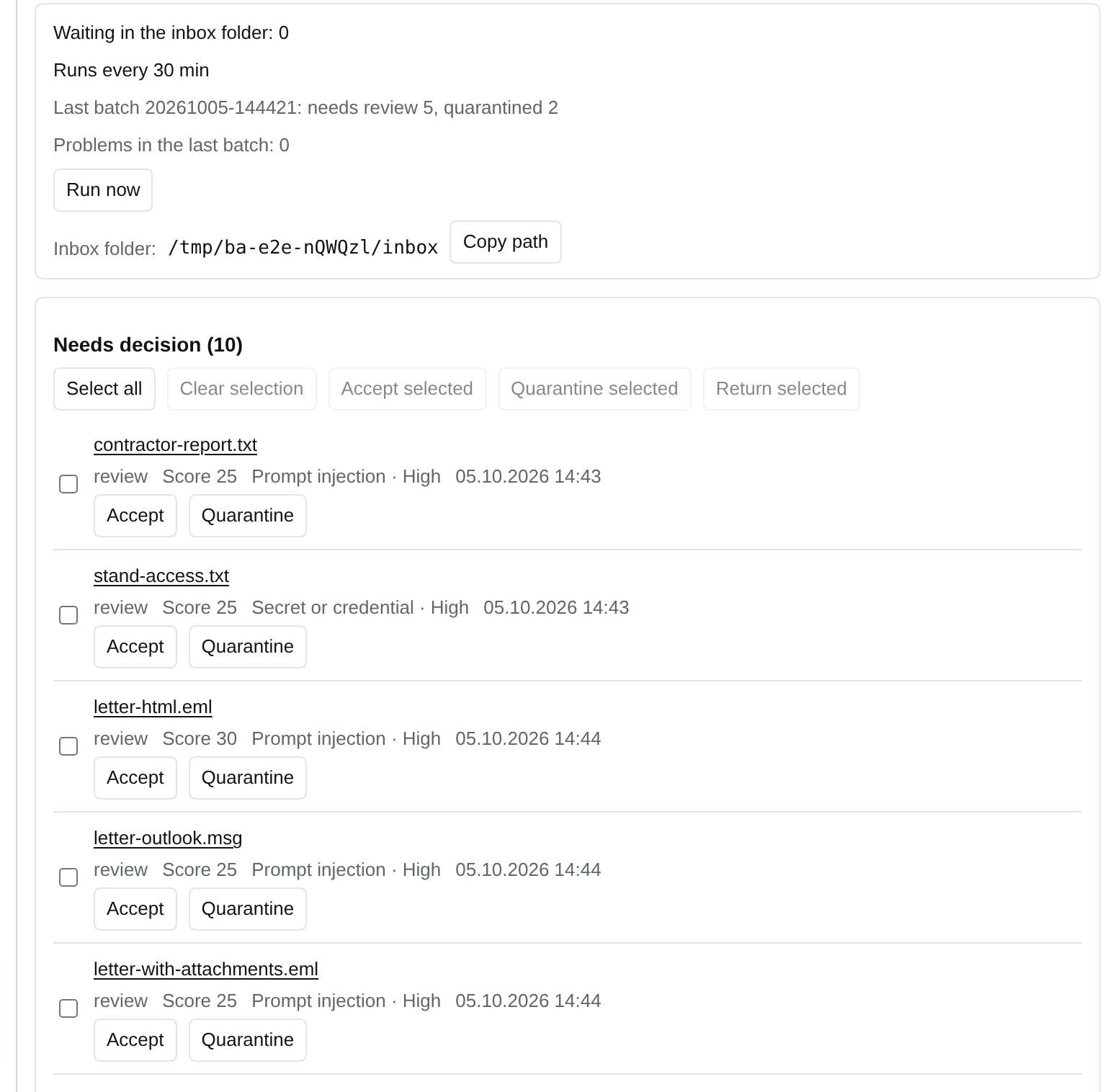
The filters work. On a trial of 46,558 files, intake sorted out almost everything by itself: it accepted 11,265, skipped 33,555 as non-documents and cut off 1,722 as duplicates. A person was left to decide on five files.
Images: two ways
Part of the company's knowledge sits in images: these are screenshots, diagrams and scans.
The first way is text recognition. It is cheap and accurate on words, and it processed the bulk of the volume: about 80 thousand fragments of the index came from images. It does not understand a diagram: if there is no text in the image, there is nothing to search for.
The second way is a vision model: it understands a diagram and can describe it, but it works more slowly and occupies the only GPU. On 5 October 2026 we tested this on an export of diagrams. In 34 seconds, 176 files went through the inbox folder, but 95 images and PDFs without text did not get into search. That was a disappointment: the diagram is there, but it cannot be found. The vision trial, though, worked beautifully: the local model described 13 such diagrams, median – 5.8 seconds per diagram, with a description of about 1,500 characters. On two PDFs that did have text, it reproduced 98 and 100% of the text's words.
The decision is made: the description produced by the model will be saved to the index; this is in progress. The images, meanwhile, never go to the cloud.
Hardware and model
The archive runs on our own hardware: a Ryzen 9 9950X3D CPU, 128 GB of memory, an RTX 5090 GPU with 32 GB of video memory. The GPU runs the local model Qwen3.8-27B, with a window of 176 thousand tokens and vision. The auxiliary model for search by meaning runs on the CPU: on the GPU it slowed the main one down by a factor of 4–15.
Our own GPU gives the main thing: the documents and the questions themselves are processed in-house and do not leave the company. There are two exceptions, and both are controllable. The first is built into the system – a fallback cloud path: images never go to the cloud, text – only if the local model does not respond for 180 seconds, and the path is switched off with a single key. The second is my own decision: search for the assistant in Telegram, described above. The price of our own model: it is weaker than the best cloud ones.
How we got here
| When | What was done |
|---|---|
| early September 2026 | the idea appeared |
| 18 September 2026 | the first version: archive search already worked |
| 3 October | the task was set: connect any model by token and replenish the archive through the inbox folder |
| 3–4 October | token-based access, gateway, intake with quarantine, a check from a neighbouring computer |
| 4–5 October | management from DSH: settings, the Archive tab, file viewing |
From the idea to collecting all the data and a working solution took a month; from the first version to the current one – 17 days. The main part – access, intake and management from DSH – took three days.
Over that time the first decisions had to be changed. Reconciling the index against the archive showed that half of the emails in it were copies. It was like a bucket of cold water. Next it turned out that attachments carried the copy date instead of the document date, and the mood turned gloomy. We fixed both errors, and after the dates were corrected the search results changed almost entirely.
Then the archive began to replenish itself, through the inbox folder. From that moment the main question was no longer "how fast does it search" but "what gets into it". That is how intake and quarantine appeared.
Our own or ready-made
A fair question: why build it ourselves if something ready-made exists? Ready-made solutions for searching company data do exist, and you can try them. Customers' sensitive materials cannot simply be put into a cloud service, so only what installs on our own premises suits us. Such products are expensive and aimed at large companies: they have almost no public prices.
We built our own from open-source components. FlyOptima is an AI-native company, and we look for ways to speed up internal processes with agents and open solutions.
We compared ourselves with the open-source Onyx (release 4.8.4) only after we had built our own.
| Feature | Onyx | FlyArchive |
|---|---|---|
| Checking a file before it gets into search | no content check, quarantine or approval queue; archive unpacking limits are present | intake with rules, a reviewer model, a queue and quarantine |
| Formats | does not read old Office formats, Outlook emails and diagrams | reads Outlook emails and diagrams, converts old Office formats |
| What has to be installed | 13 containers with separate database servers | a few services and files on disk |
| Ready-made chat and agents | yes | no chat of its own, the DSH shell is used |
| Connections to cloud services | 57 ready-made connections | none, sources are exported as files |
| Permissions on individual documents | available in the paid part | none, there is one trust zone |
| Recent documents higher in search | not implemented | taken into account |
It is reasonable to take Onyx when you need a ready-made chat, connections to cloud services and permissions for many users. Building your own makes sense when checking every file before search and a simple installation matter more.
What is not solved and what is planned
Not everything is done. Scans and images of diagrams without text are not searchable yet: saving the model's descriptions is in progress. The search reopens the index every time, and that takes most of its time.
The plans are to separate access for employees and to strengthen information security.
- Separate access: each employee will see only their own sources and projects. Right now there is one trust zone.
- Issue tokens with an expiry by default and receive alerts about unusual requests based on the request log.
- Move the archive services under a separate system user, and the shell with the chat – into a sandbox.
- Add the gateway's own encryption in addition to the encryption of the private network.
The FlyArchive 0.1 code and the DSH plugin are open on GitHub, together with a description of installation and configuration: github.com/andrewsabn/flyarchive. The server side is released under AGPL-3.0, the plugin – under MIT.
At our company, people now ask the archive, in their own words, which version of the diagram was agreed with the customer, and the answer comes with a link to the document.
The future has already arrived. What used to seem impossible – our own Google inside the company – is already a reality in 2026. Keep following the new world.